InSinkErator Garbage Disposal Reset Button: Find It and Reset Safely
Let’s find that little red button, try the right reset, and work out what to do if your disposal still won’t cooperate.

Let’s start under the sink. On InSinkErator models with a reset button, you’re looking for a small red square on the bottom of the disposal. If you can’t find one, don’t worry—some models reset automatically after cooling down. We’ll check which kind you have.
And no, a disposal that’s stopped working doesn’t automatically mean you need a new one. Let’s take this one step at a time.
Warning: Turn the disposal off. Before using a tool or trying to remove anything, unplug it. If it’s wired directly into the house, turn off its circuit breaker and make sure it cannot start. If you’re unsure how to do that, stop and ask for help. Never put your hand inside the disposal.
Where is the reset button on an InSinkErator?
Look underneath the disposal for a small red square button. On models with a manual reset, that’s the one you want.
Grab a flashlight first. Your phone’s light will do if you can keep it safely away from water. You’re looking at the bottom of the machine under the sink, not down through the drain.
You may also see a hole in the middle of the bottom. That hole is not the reset button. It’s where a wrench goes on certain models when something is stuck. We’ll come back to that only if we need to.
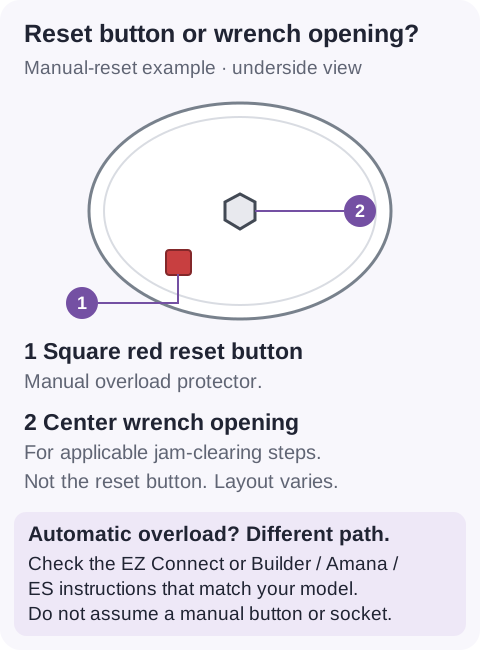
I once went looking for that button with a wrench in my hand and my glasses upstairs. Excellent preparation, apart from the seeing part. Get yourself a decent light before you start. You’re allowed to make this easy on yourself.
Can’t find the button? You may have a model that resets automatically. Pick yours below and I’ll point you to the right steps. If it isn’t listed, check its manual rather than guessing.
This lookup is for InSinkErator. If yours is another brand, follow its own instructions.
Which reset does mine use?
Pick the name on your disposal’s label, and I’ll point you to the right steps.
Look for the name on the disposal’s label. You don’t need the serial number.
A small list of confirmed US models, not every model ever made. You can still read both reset methods below without using this lookup.
How do you reset your InSinkErator?
If yours has the red button, turn the disposal off and gently press that button back in. If your model resets automatically, leave it off to cool as described below.
Before either one, a quick distinction: resetting and unsticking are two different jobs. Pressing the button resets a safety switch. It won’t pull a stuck object out of the machine.
If you already heard a hum but nothing was grinding, leave it off and go to “Why does it still hum—or do nothing?” below. There’s no prize for making it hum a second time.
If you found the red button
- 1Leave the disposal switched off. Find the little red square underneath it.
- 2Press it gently. You’re pushing a button back in, not holding down a stubborn doorbell.
- 3If it won’t stay in, give it time. Leave the disposal off, wait ten minutes, then try again. That’s the wait InSinkErator gives for this manual-reset step.
- 4If it stays in, get ready for one short test. Make sure any tools are removed. Restore power if you unplugged it, run cold water, then briefly turn the disposal on using its normal switch.
- 5If it hums, trips again or still won’t work, turn it off. We’ll look at what happened next rather than keep pressing the button.
You don’t need to hold the red button down for a long count. InSinkErator says to press it gently. If it won’t stay in after the cooling-and-reset instructions, don’t force it.
If your model resets automatically
For the automatic-reset models covered by InSinkErator’s troubleshooting instructions, here’s what the company says:
- You operate it with a wall switch: turn that switch off and let the disposal cool for up to 20 minutes before turning it back on.
- You operate it with a push-button air switch: turn the disposal off and unplug it for up to 20 minutes before plugging it back in. That’s the button-operated setup often found on the countertop.
If your setup doesn’t match either description, check your model’s manual. Don’t open an electrical cover to work it out.
And remember, cooling down won’t remove a jam. If something is stuck, it still needs the right check for your particular model.
Why won’t the reset button stay in?
It may still need to cool down. Leave the disposal off, wait ten minutes and try gently pressing the button again, as InSinkErator directs for its manual-reset models.
Now, there are two different things you might mean by “won’t stay in.”
It pops back out while you’re trying to press it: follow that cooling-and-reset instruction. Don’t tape it, wedge it or keep your finger on it to make the machine run.
It stays in, but trips again when you switch the disposal on: the reset hasn’t solved what’s wrong. Leave it off and have the problem checked rather than repeating the same test.
I know it’s tempting to think, “Maybe one more try.” But knowing when to stop is part of being handy. You haven’t failed at fixing it because the next step needs someone with different tools.
Why does it still hum—or do nothing?
If it hums without grinding, something may be stuck; if it stays completely quiet, the reset hasn’t restored operation. Neither sound—or lack of sound—tells us on its own that the motor is finished.
1. It hums, but nothing moves
Turn it off. Before any tool goes near it, disconnect the power as described at the top of this guide.
Some InSinkErator models let you work a stuck mechanism loose using a wrench in the center opening underneath. Others use a different method. Check your model’s instructions before picking up the wrench.
For a model that uses the bottom opening, follow InSinkErator’s directions for moving the supplied wrench back and forth. Remove the wrench before any powered test. If an object needs removing from inside, use tongs, never your hand.
I’m deliberately not giving you one wrench routine for every model. InSinkErator gives EZ Connect units a bottom-wrench method, but its Builder Series, Amana and ES instructions describe another approach. Use the matching section of the manufacturer’s jam-clearing guide.
Lost the little wrench? Check for the original one first. On models that use that bottom opening, InSinkErator also allows a correctly fitting ¼-inch Allen wrench—the familiar L-shaped tool. If you already have one that fits, you don’t need to buy another tool.
If you have neither, the InSinkErator Jam-Buster wrench is an optional replacement. It helps with the applicable jam-clearing job; it doesn’t reset the button, and it isn’t a tool for every kind of disposal.
2. It’s completely quiet
Leave its operating switch off while you check the simple things: is a cord-connected unit still plugged in, and have you followed the reset instructions for that model?
If that doesn’t get you an answer, check the model’s power instructions or call for help. Don’t start opening wiring covers. Silence alone isn’t enough to tell us which part is wrong.
3. It keeps stopping—or something looks wrong
If it repeatedly trips, leave it off and arrange a diagnosis. If you notice leaking, damaged wiring or a burning smell, don’t try another reset to see whether it goes away.
A persistent problem is also a reasonable time to check how old your disposal is. That can help you put a repair quote in perspective later. It won’t tell you what’s broken.
Check age · Free tool
How old is your garbage disposal?
Use its serial number to check its age before weighing up a repair.
Next: After it works again
If it’s running normally again, you can move on to keeping it that way. One reset isn’t a reason to go shopping for a new disposal.
There’s always someone helping after a family dinner who treats the disposal like it’s competing for a scholarship. Everything goes in, and we all discover its limits together. A little restraint makes for a quieter evening.
For everyday use, InSinkErator’s advice is straightforward:
- Run a moderate flow of cold water while grinding.
- Keep the cold water running for a few seconds after grinding finishes.
- Keep grease and fat out of the disposal and drain.
The cold-water advice is for grinding. InSinkErator says draining hot water between grinding periods is fine, so you don’t need to worry about every warm pan you wash.
When you have a minute, read our simple habits to help your garbage disposal last longer. No need to turn the reset button into a regular chore. If you keep needing it, get the recurring problem checked.
Maintain · Care guide
Help your garbage disposal last longer
Simple care habits, what to avoid and what to expect as it gets older.
When should you consider repair or replacement?
Consider that choice when a problem persists or you have a repair quote—not just because the disposal stopped once.
First, find out what needs fixing. Then look at the repair cost, the disposal’s age and whether any warranty applies. That’s a much better basis for a decision than standing under the sink, listening to a hum and imagining the worst.
Our garbage disposal repair-or-replace guide can help you work through that choice.
If replacement does make sense, our replacement-cost guide explains the budget side before you commit.
Repair · Decision guide
Repair your disposal or replace it?
Put the fault, its age and the repair quote together before deciding.
Replace · Cost guide
What does disposal replacement cost?
See the unit and installation costs before you commit.
But if it’s working again, you’re done for today. Put the flashlight somewhere you’ll remember. Your glasses, too.
Sources
- InSinkErator — Resetting a Garbage Disposal — Manual overload-button location, gentle reset action, cooling and automatic-overload distinction.
- InSinkErator — Fixing a Jammed Garbage Disposal — Separate model-family procedures, compatible wrench alternative, automatic cooling instructions and care guidance.
- InSinkErator — Jam-Buster Wrench — Manufacturer accessory purpose and bottom-socket application. Not a universal compatibility claim.
The Garbage Disposal Series
- 1How Old Is My Garbage Disposal? InSinkErator and Other BrandsDecode the serial number and see where it sits against a typical lifespan.
- 2How Long Does a Garbage Disposal Last?The 8-to-15-year range, what wears one out, and the signs it is near the end.
- 3How Much Does It Cost to Replace a Garbage Disposal?Unit prices by horsepower, what a plumber charges, and when a repair is the smarter spend.
- 4Should You Repair or Replace a Garbage Disposal?The leak-location test, what is worth fixing, and the half-the-price-of-a-new-unit rule.